Correlation ID
How we track and link anonymous web visitors to WhatsApp conversations.
Structure
The Correlation ID is a unique session identifier generated when a user interacts with the widget.
- Format:
O-XXXXXXX(e.g.,O-aB3dE9z) - Composition: The prefix
O-followed by 7 random alphanumeric characters. - Uniqueness: Globally unique across the platform.
Lifecycle & Flow
- Widget Click: The user clicks the widget on the website.
- Session Check: We check if this device (
deviceId) has an existing session from the last 12 hours.- Returning User: The existing Correlation ID is reused.
- New User: A new unique ID is generated.
- Webhook Trigger: The
widget.clickevent is sent to your webhook immediately. - WhatsApp Handoff: The user is redirected to WhatsApp with a pre-filled message containing the ID.
- Message:
Reference: O-aB3dE9z (Please send this reference number...)
- Message:
- Correlation: When the user sends the message, our system parses the ID and links the WhatsApp conversation to the original web session data.
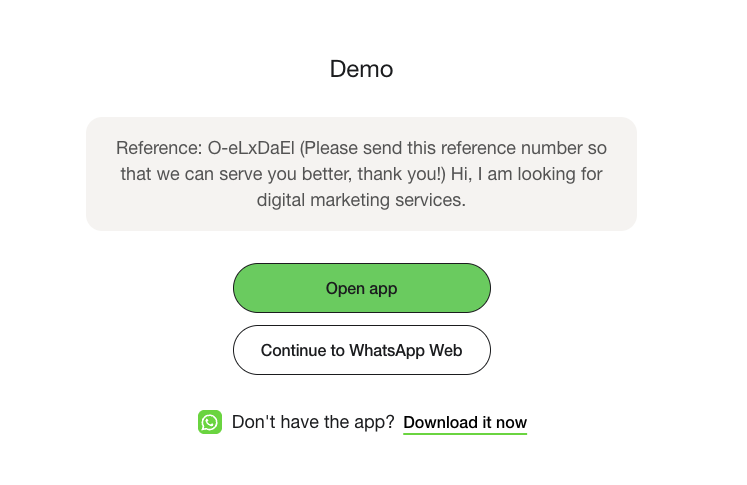
A screenshot of the WhatsApp interface showing the pre-filled message with the Correlation ID (O-XXXXXXX);
Obtaining the ID
You can obtain the Correlation ID in real-time via our Webhooks or fetch historical data via our API.
Webhook Payload
Subscribe to the widget.click event to receive the ID before the user even sends a message.
{
  "event_type": "widget.click",
  "data": {
    "correlation_id": "O-aB3dE9z",
    "device_id": "...",
    "click_url": "https://example.com/landing",
    "parsed_params": {
      "utm_source": "google"
    },
    "user_agent": "...",
    "ip_address": "..."
  }
}
Attribution History API
You can fetch the past correlation history using the Attribution Logs endpoint. This is useful for auditing and reconciling data within your own system.
Endpoint: GET /integrations/external/attribution
Request
curl -X GET \
  "https://chatbot-api.oomdigital.com/integrations/external/attribution?limit=5" \
  -H "Authorization: Bearer <YOUR_AURIX_API_KEY>"
Response
{
  "status": 200,
  "message": "ok",
  "data": [
    {
      "correlation_id": "O-PimWNfy",
      "device_id": "16e1d281-9fc7-48fa-b34c-2dbac4ae4879",
      "created_at": "2026-01-07T09:52:24.744651Z",
      "correlated_at": "2026-01-07T09:53:40.377977Z",
      "click_url": "https://app.aurix.com.sg/auth/login",
      "parsed_params": {},
      "ip_address": "101.100.185.9",
      "user_agent": "Mozilla/5.0 (Macintosh; Intel Mac OS X 10_15_7) AppleWebKit/537.36 (KHTML, like Gecko) Chrome/143.0.0.0 Safari/537.36",
      "lead_type": null
    },
    {
      "correlation_id": "O-nJrY6B3",
      "device_id": "cfc2b353-2f46-4c0b-a473-1efc196fc98d",
      "created_at": "2026-01-07T09:34:27.074392Z",
      "correlated_at": null,
      "click_url": "https://app.aurix.com.sg/auth/login",
      "parsed_params": {},
      "ip_address": "101.100.185.9",
      "user_agent": "Mozilla/5.0 (Macintosh; Intel Mac OS X 10_15_7) AppleWebKit/537.36 (KHTML, like Gecko) Chrome/143.0.0.0 Safari/537.36",
      "lead_type": null
    }
  ]
}